AI Campaign Journal’s Codex operator inspected the file and interface on October 28, 2026, Beijing time. The owner completed the native save and file selection. The image and synthetic text were existing test material; they were not generated again today. Read the exact inputs, returns and stopping points.
Does the file contain pixels or only a link?
The received file, image-save-20261028.ai-rpg.json, was 194,590 bytes. A JSON parser opened it directly and read format as perchance-ai-rpg-v1. Its keptImages list contained one object. That object had a dataUrl beginning data:image/jpeg;base64, rather than only an external image address. We decoded that value into 144,126 bytes and opened the result as a valid 768-by-768 JPEG. These measurements came from the saved file, not from the size of a screenshot. We stopped after decoding and viewing the image; we did not test the application without a network connection.
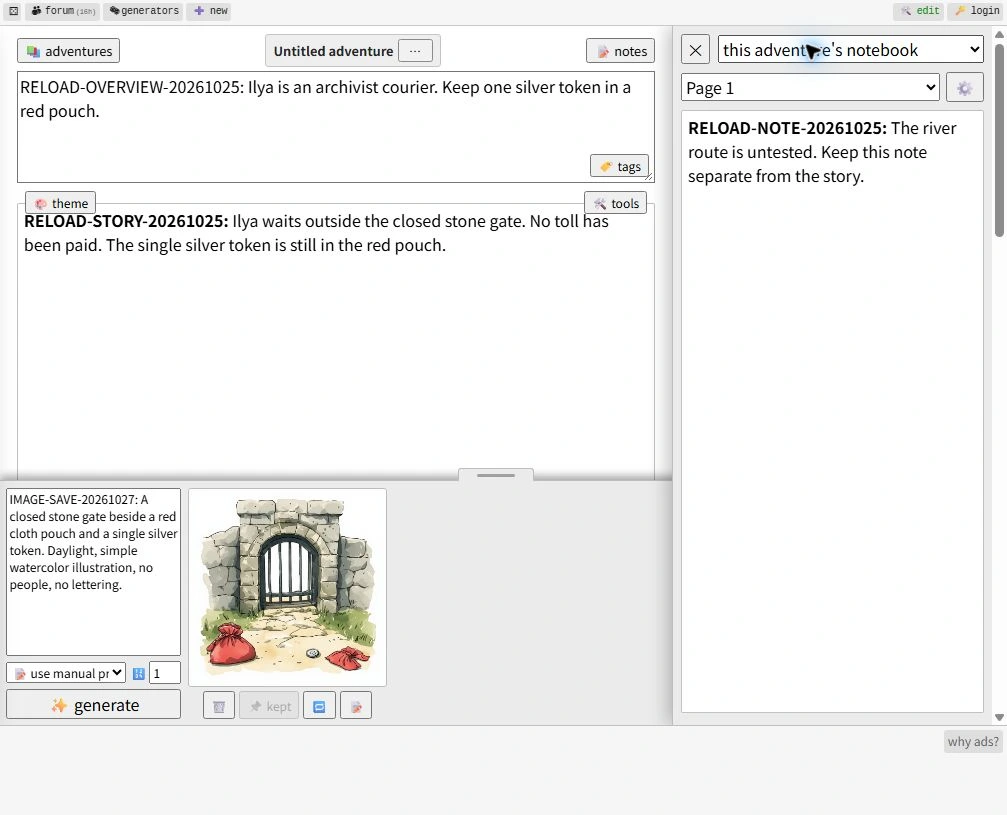
The image object also contained its own prompt. It matched imageGuidance in the same file, including the IMAGE-SAVE-20261027 marker, the closed stone gate, the red cloth pouch and the silver token. The decoded picture showed the gate and coin, but it also showed two red pouch shapes. We therefore record successful image inclusion without calling the illustration a perfect match to the prompt. The prompt and picture originated in the October 27 fixture; today’s new result is their presence in the October 28 save.
What appeared after choosing the native save?
| Check | October 28 observation | Boundary |
|---|---|---|
| Embedded image | One JPEG decoded and opened | One file inspected |
| Picture in interface | Gate, coin and red pouch forms visible; kept label | Same Chrome profile |
| Overview and story | Full strings match saved JSON | No continuation generated |
| Notebook | Page 1 matches saved note | No narrator query |
We opened the native load control and saw Import adventures, From file and choose file. The automated file-chooser listener timed out, so the owner selected the preserved file. Afterwards the import panel was gone and the adventure list contained one additional entry. Opening notes displayed this adventure’s notebook with Page 1 selected. The image tray visibly displayed the stone-gate illustration and its disabled kept control. We stopped at this rendered interface, with no new image generation or story continuation.
The visible overview matched the file’s full RELOAD-OVERVIEW-20261025 line about Ilya carrying a silver token in a red pouch. The story separately matched RELOAD-STORY-20261025, including the closed gate and unpaid toll. Page 1 matched RELOAD-NOTE-20261025 and its instruction to keep the untested river route separate from the story. The manual image prompt was visible alongside the picture. These are observations collected today against older fixture strings, not claims that the markers were newly typed today.
What does this test leave unresolved?
The original adventure remained in the same browser profile. An attempted New action did not establish a verified blank baseline. Consequently the loaded interface is not an isolated demonstration that every displayed value could only have come from the selected file. The file inspection independently establishes that the JPEG bytes were embedded; the screenshot establishes what was visible after selection. We do not turn those two observations into a cross-device guarantee. No storage deletion, clean profile, offline load, damaged-file recovery or repeated-import reliability test was performed.
Our earlier native-backup inspection used an image-free fixture. An empty keptImages list in that older file was not evidence that image saving was unsupported. The refresh test asked a different question and did not involve selecting a downloaded backup.
How should you check your own picture backup?
Use a disposable adventure and keep the original file untouched. Check that the saved image has actual embedded data, then inspect the native load result and notebook separately. Our evidence scope is three inspected official reference pages: Perchance’s visible help, AI Dungeon’s settings documentation and FableAI’s memory guide. Those are documentation comparisons, not matched image-backup tests on three services. None establishes a reliability ranking.
Before relying on a picture backup, open a disposable saved file and check the image itself, not just its prompt.