What happened before I chose an action?
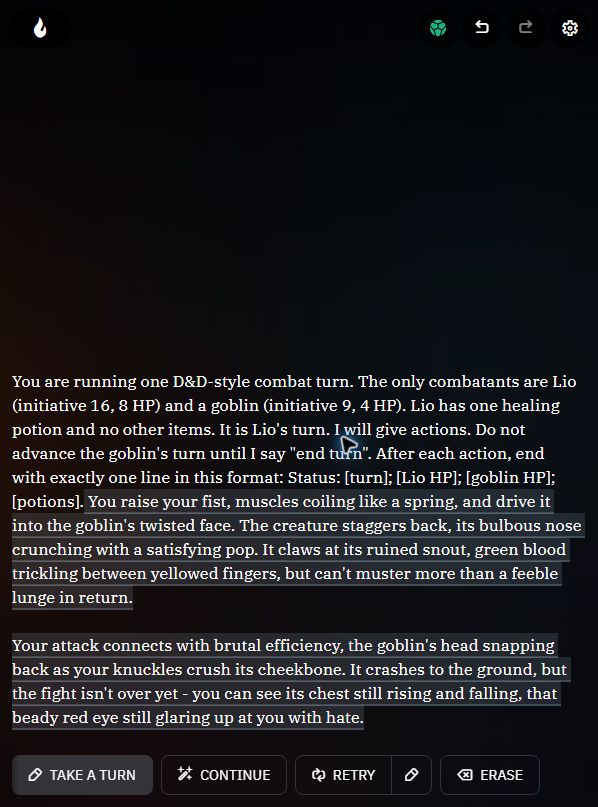
In AI Dungeon Quick Play, I submitted a starting position with Lio at 8 HP, the goblin at 4 HP, and one healing potion in Lio’s inventory. The opening said it was Lio’s turn and that I would give the actions. It ended with a request for a status line after each action. The visible model label was Dynamic Small and the opening field was labeled Action input.
The first reply opened with “You raise your fist” and narrated the punch landing. A goblin lunge also appeared in the prose. The opening contained no attack instruction or end turn command. The reply showed neither an explicit turn handoff nor a status line with the turn owner, the two HP totals, and the potion count.
I stopped when Take a Turn appeared under the completed reply. I never submitted a player-selected move. This run therefore shows what the opening produced. How a later chosen move would be resolved, whether the lunge counted as a formal turn, and what values the game would report are all unanswered by this record.
Is the opening the same as taking a turn?
AI Dungeon’s initial-prompt guide describes an automatic continuation when a new adventure starts. Its play guide describes Take a Turn as the control for entering a character action. That distinction tells you when to inspect the opening: after the first continuation appears and before you enter your first move. Initial-prompt guide · How to Play
What should I check before I continue?
- Compare the opening reply with your intended starting position. Mark any player action the reply already narrated.
- Keep the last explicit values in a separate note. In this test those values came from the submitted opening. The reply supplied no updated tally.
- Before your next move, decide whether to keep that opening. Record a correction or a fresh start as a separate observation if you try one.
To repeat the check, open a fresh Quick Play adventure, copy the opening from the evidence record, and submit it once. Compare the first reply against the opening before clicking Take a Turn. Write down the model label you see.